
In 1.0, the Armory is where you select unlocked Scissors, Spells and Special Skills. You begin with only the default Scissors and limited Spells; additional options unlock through chapter progression and other conditions.
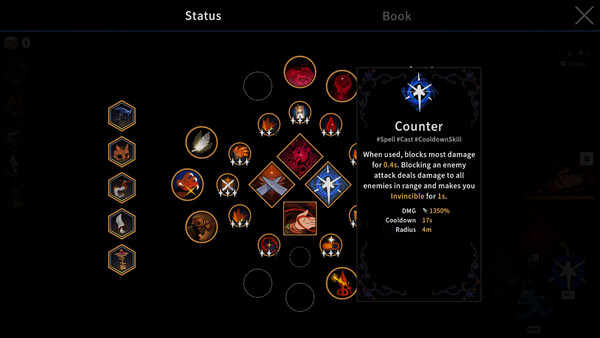
Before entering a chapter
- Pick one Scissors whose input rhythm you can execute.
- Pick a Spell that covers the weapon’s weak moment.
- Give the Special Skill one job: engage, escape, setup or burst.
- Enter with one desired Imprint branch and one fallback.
What changes during the run
Imprints can change how a skill behaves. Relics connect separate skills. The Armory determines your starting loop, while drops determine how the loop branches.
Chapter 1 versus later chapters
| State | Available choice | Best decision |
|---|---|---|
| New save | Default Scissors and limited Spells | Learn one full-combo and one Spell timing. |
| Progressing chapters | More Scissors and Spells unlock | Change one slot at a time. |
| After Epilogue 3 | Challenge Mode available | Use real-time DPS for controlled comparisons. |
Quick answer
Use the Armory before a run to equip unlocked Scissors, Spells and a Special Skill. Keep one primary damage rhythm, one answer to its unsafe moment and one fallback plan for random in-run rewards.
Loadout slot jobs
| Slot | Decision | Bad sign |
|---|---|---|
| Scissors | Choose combo, charge or repeated-contact rhythm | You cannot execute its defining input |
| Spell | Add range, control, burst or a confirmed resource bridge | It competes with the weapon without covering a weakness |
| Special Skill | Give it one job: engage, escape, setup or burst | It is always unavailable when the weapon becomes unsafe |
Missing unlock checklist
- Confirm the intended chapter or Epilogue was cleared on this save.
- Return to Sil's House instead of beginning another run immediately.
- Open the Armory and inspect every category.
- Read the current tooltip and compare the item against the equipped baseline.
- If absent, continue official story progress; do not rely on an unsourced exact unlock table.
Loadout troubleshooting
| Symptom | Cause | Change |
|---|---|---|
| New weapon feels weaker | Its combo or charge condition is not being completed | Practice its defining input before comparing DPS |
| All four skills need different setups | No single damage engine | Rebuild around one repeatable action |
| Unlocked option does not appear | Wrong save or progress state | Continue the latest cleared save and recheck |
| Run depends on one rare reward | No fallback | Choose a functional substitute for uptime, control or recovery |
A/B test a new unlock
Save the old loadout, equip one new component and enter the same progression state. Perform the new component's defining input correctly before comparing it. Record sustained DPS, clear time, interruptions and damage taken. If the new piece fixes the intended weakness without breaking the primary loop, keep it; otherwise restore the baseline and test a different slot.
Do not confuse an unlock with an upgrade. A newly available Scissors can be a different rhythm rather than a larger number. The Armory is a choice surface, not a straight power ladder.
Version boundary
Official 1.0 notes confirm Armory selection, limited starting options and additional unlocks through progress and other conditions. This guide does not invent a complete chapter-by-chapter unlock table.
Three Armory scenarios
New save: keep the default Scissors, learn its complete combo and choose a Spell that creates a safe opening. New unlock: change one slot and practice the defining input before comparing. Post-Epilogue 3: preserve the story-clear baseline for the first Challenge Mode test, then adapt from observed failure.
After every return, inspect permanent options before assuming a failed run produced nothing. When an expected item is absent, verify the correct save and progress state. Exact unlock conditions require direct evidence; this guide does not turn one player's timing into a universal rule.
A/B test an unlock
Save the old loadout, equip one new component and enter the same progression state. Perform the defining input correctly, then record sustained DPS, clear time, interruptions and damage taken. Keep the unlock only when it fixes the intended weakness without breaking the primary loop. A newly available Scissors is a different rhythm, not an automatic numerical upgrade.
Armory advice is versioned to 1.0. A later patch can alter exact unlocks or tooltips, so preserve the save state and current screen when reporting a correction.
Keep a screenshot of the baseline loadout before testing a new unlock. That one record makes restoration, comparison and later correction much easier.
Frequently asked questions
What can I equip in the Armory?
Once unlocked, you can freely choose your Scissors, Spells and Special Skill in the Armory.
Are all weapons unlocked at the start?
No. Version 1.0 starts with the default Scissors and a limited selection of Spells. More unlock through chapter progress and other conditions.